
How to integrate OneSignal Push Notification in Ionic React
Complete integration steps OneSignal Push Notification Ionic React
Install npm Package
npm install onesignal-cordova-plugin
npm install @ionic-native/onesignal
ionic cap sync
React apps must use Capacitor to build native mobile apps. However, Ionic Native (and therefore, Cordova plugins) can still be used.
// Install Core library (once per project)
npm install @ionic-native/core
In you App.tsx
import { Capacitor, Plugins } from ‘@capacitor/core’;
import { OneSignal } from ‘@ionic-native/onesignal’;
Hello world!
Welcome to WordPress. This is your first post. Edit or delete it, then start writing!
Outsource Software Development
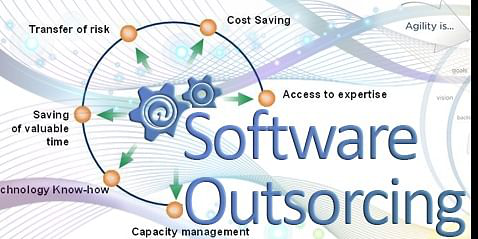
Software Outsourcing:
Software outsourcing, means an organization chooses other third party software agencies to carry out their software development project. It is a process of delegating control of their own business, to an eligible external organization, that has the capability to handle their business requirements.
Services of Software Outsourcing:
The general software outsourcing services are the mobile and web application development. The other advanced services include the Artificial Intelligence, Cloud computing and Robotic process automation, Specially developed SaaS based products, automatic business process, software consulting and more. They will provide a complete set of software outsourcing services based upon the business needs.
Software outsourcing companies must explain the projects at any stage of the Software Development Life Cycle (SDLC). They also have to provide the software solutions at anytime to their clients. Nowadays, the services are under the remote operation model, that will help the clients to find highly skilled IT professionals across the globe.
Importance of software outsourcing:
Software Outsourcing is most needed, when the business owner wants to focus on their core competencies. It will help to achieve a variety of business objects. It is the cost effective service for the business development. It will reduce the workload of the business owner and also keep their strategies on the right way.
Software outsourcing models:
There are 3 business models for software development outsourcing.
- Onshore
- Offshore
- Nearshore
Onshore:
Onshore software outsourcing companies deal with teams from their home country. This is the high cost process in Software outsourcing without any language barrier, that makes the communication much easier.
Offshore:
Offshore companies are working with the teams from other countries. These companies operate remotely with the most affordable prices.
Nearshore:
Nearshore works in the middle between onshore and offshore. They work with teams in the same time zones, mostly deals with the neighboring countries. This is also a high cost process in software outsourcing.
Apart from these models, most of the companies have a comprehensive set of other models like fixed price model, time based model, material based model, resource model, development team model and more.
Advantages and Disadvantages of software outsourcing:
Advantages:
- Makes software development easier
- Reduce the pressure of the business owners
- Flexibility
- Having time to focus on core competencies.
- Cost effective process.
- Business improvement with advanced strategy.
- Quick project delivery to market launch.
Disadvantages:
- Language barrier
- Beware of the Low quality services.
- Security risks
How to do software outsourcing effectively?
There are numerous suggested ways to get a success in software outsourcing. But there is not guarantee for hundred percent success of the outsourcing project. But there is certain strategies should be followed to get a quality product from the outsourcing company. Agile methodology is highly recommended for the flexible project management to get a better quality.
- Establish the correct reasons for outsourcing
- Set a clear goal about the project
- Always track the SDLC progress
- Frequently collaborate with remote teams
- Be flexible with the team
- Always give a feedback
- Have realistic expectations
Reasons to choose Vectorilo for software outsourcing:
- We have a great experience in outsourcing software development.
- We deliver a better quality software services across the world.
- We are expertise in the managed team extension.
- Our team’s focal point is the client satisfaction.
- We clearly identify the clients needs.
- We fully committed to provide the best software services across the globe.
- We don’t have any language barriers.
- Our team gives a frequent updates to the clients about the project.
- We can change the process based upon the needs.
- Our services are best quality with time reduction and cost effective.
Amazon WorkMail migration
Do you want to move your email to amazon workmail?. This article helps you to relocate your email to amazon work mail.
Amazon Web services (AWS) developed the business email and calendaring service called amazon workmail. You can easily access this work mail on desktop using email clients or their own Android and IOS applications. You can shift to amazon workmail from many other platforms with the help of amazon collaborated partners.
Make users in Amazon Workmail:
First, you have to create a mailbox in the workmail for new user. In that mailbox, they can sign up and access their mail from Amazon WorkMail application. Steps to create a user in workmail.
- Click the Amazon Workmail link – https://console.aws.amazon.com/workmail/
- Choose the region, if it is necessary.
- Choose the name of your organization.
- Choose create a user.
- Enter the user’s details in ‘Add the details for your new user’.
- Enter the user’s email address and password in ‘Set up email and password’.
- Select Add user.
Move to Amazon WorkMail:
For migration, you can use any migration tools from AWS migration partners. To Know about the AWS – https://aws.amazon.com/workmail/features/
- Create a user account in the Amazon WorkMail Console.
- Enable the user account from the list of disabled users.
- For organizations, choose the organization account, migrate and edit.
- Select ‘on’ for mailbox permissions.
- Select the user to act as migration administrator and save.
- After migration, check the DNS records and configure your clients.
Advantages of WorkMail:
- Simple to manage the business infrastructure in Amazon WorkMail.
- End to end Encryption based on the region you choose.
- Access anywhere without end user configuration.
- Secure integration with your existing directory.
- Low cost service with high storage capacity.
Create PPT From Excel Macro
Sub CreateSlides()
‘Open the Excel workbook. Change the filename here.
Dim OWB As New Excel.Workbook
Set OWB = Excel.Application.Workbooks.Open(“E:\viratkohli.xlsx”)
‘Grab the first Worksheet in the Workbook
Dim WS As Excel.Worksheet
Set WS = OWB.Worksheets(1)
‘Loop through each used row in Column A
For i = 1 To WS.Range(“B65536”).End(xlUp).Row
‘Copy the first slide and paste at the end of the presentation
ActivePresentation.Slides(1).Copy
ActivePresentation.Slides.Paste (ActivePresentation.Slides.Count + 1)
'Change the text of the first text box on the slide.
ActivePresentation.Slides(ActivePresentation.Slides.Count).Shapes(1).TextFrame.TextRange.Text = WS.Cells(i, 2).Value
ActivePresentation.Slides(ActivePresentation.Slides.Count).Shapes(2).TextFrame.TextRange.Text = WS.Cells(i, 3).Value
Next
End Sub